
Here you can download two free flyer templates, Bold Community and Clean Business, each as an editable Word file and a PDF. They suit bake sales, club meetings, lost pets, tutoring, open houses and small business offers. Open the Word file, swap in your own wording, then print at home or at a copy shop. The sample text shows you where each detail goes.
Free flyer templates to download
Both templates are free. Pick the design that fits your event, preview it below, then download the format you need.
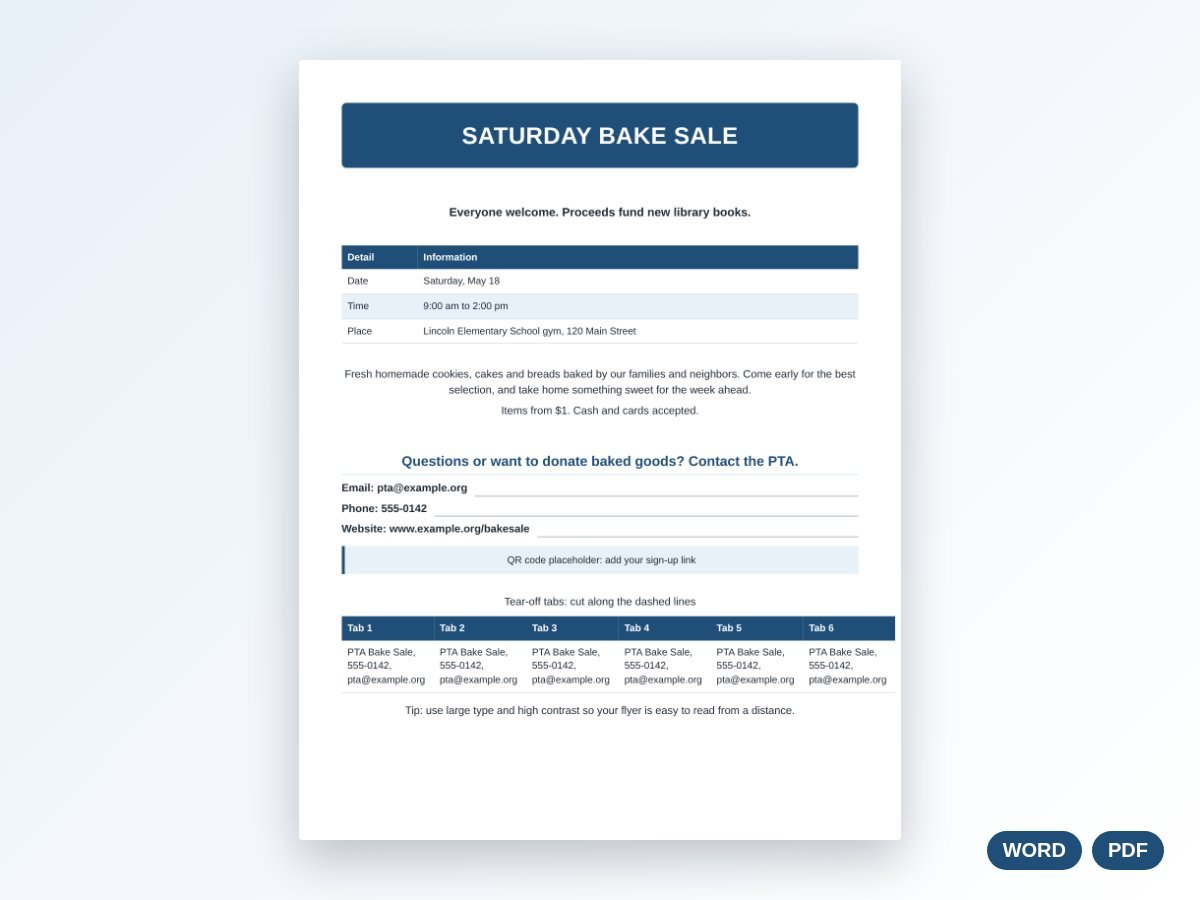
Bold Community
A high-contrast flyer with a big headline banner.
- Best for: school, church, club and neighbourhood events
- Includes: headline banner, details table, call to action with contact fields, six tear-off tabs
- Formats: Word (.docx) and PDF
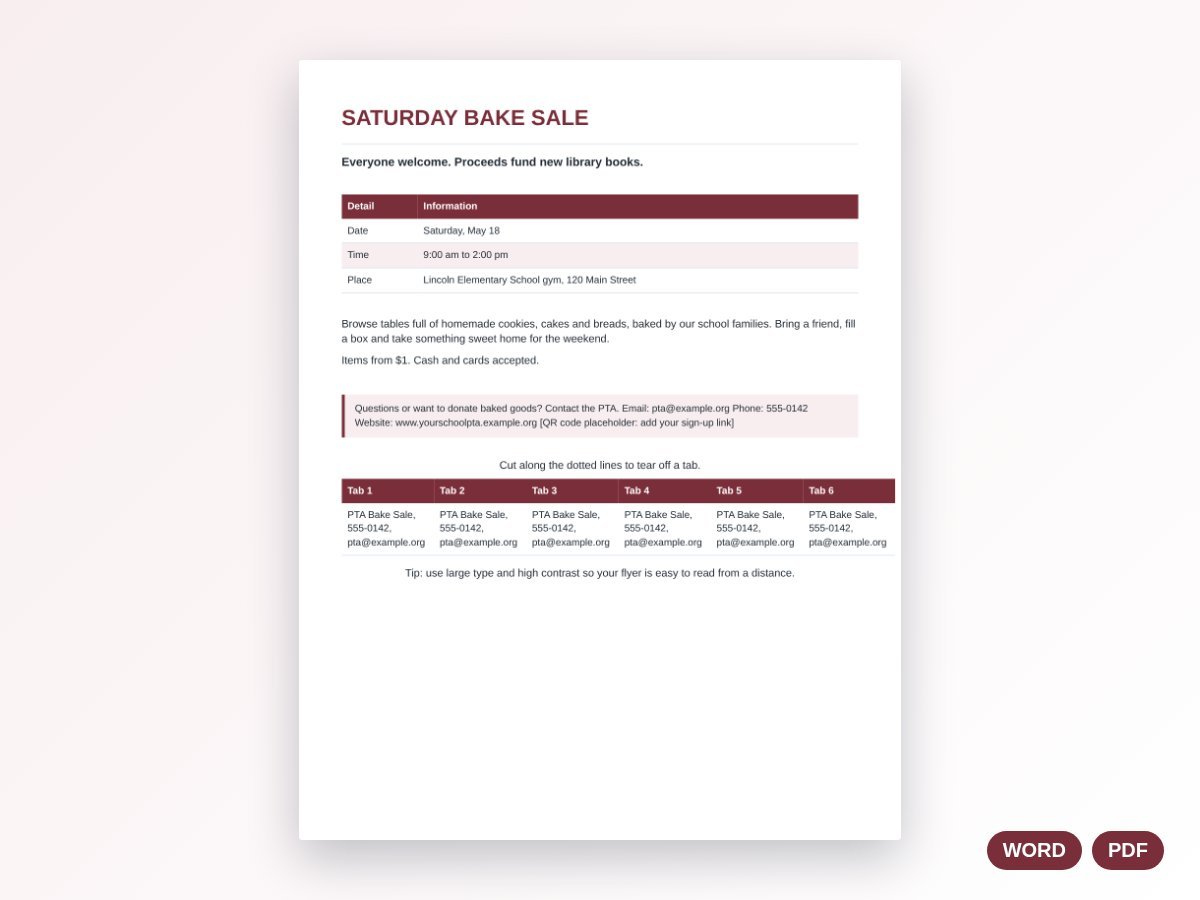
Clean Business
A refined, light-toned flyer.
- Best for: small businesses, services, tutoring and open houses
- Includes: headline, details table, six tear-off tabs
- Formats: Word (.docx) and PDF
What is included in the flyer templates
Both designs follow the same basic layout. At the top is a large headline, filled in as "SATURDAY BAKE SALE" so you can see the scale it is meant to have. Under it is a short line that says who the flyer is for and why the event matters: "Everyone welcome. Proceeds fund new library books."
Next comes a two-column details table with "Detail" and "Information" headings. Use it for the date, time, place and anything else readers need to know, such as a price.
Bold Community, the high-contrast design, adds a call to action ("Questions or want to donate baked goods? Contact the PTA.") followed by email, phone and website fields. Clean Business is lighter and leaves that block out. You can add your contact details to the details table instead.
Both designs end with a row of six tear-off tabs, so people passing a notice board can take your details with them. You can browse more designs in our flyer templates collection.
How to fill in your flyer
Start with the headline. Give it one clear message, such as "LOST DOG" or "Saturday Bake Sale". If the headline tries to say two things, readers will take in neither.
Put the date, time and place in the details table near the top, because that is what people look for first. Keep the body text to a few sentences, and state the cost if there is one.
Sample wording for common uses:
- Lost pet: "LOST DOG: Brown beagle, answers to Max, last seen near Oak St. and 5th Ave. Call 555-0142."
- Bake sale: "Saturday Bake Sale, 9am to 2pm, Lincoln Elementary gym. Proceeds fund library books. Contact PTA: pta@example.org."
For the tear-off row, edit the text in the first tab, usually a name and phone number, then copy it into the other five. If you do not need tabs, delete the row. For a similar layout built around a different design, see this flyer template.
Printing and posting tips
Print on US Letter paper at home or at a copy shop. Once the flyer is finished, save it as a PDF. A PDF keeps fonts and spacing in place, so it usually prints more cleanly than a Word file sent to someone else's computer.
Flyers are often read from across a hallway or a car park. Use large type and strong contrast, such as dark text on a light background, so people can read yours from a distance. Bold Community is built for this.
Many bulletin boards in shops, libraries and community centres need approval before you post anything, so ask first. If you want several smaller copies from one sheet, print your page and ask a copy shop to reduce and cut it.
Political flyers need a disclaimer
Nothing in the sources we checked requires a general community, lost-pet or business flyer to carry specific wording. Political flyers are different.
Under federal rules, printed communications that expressly advocate for or against a clearly identified federal candidate, or that ask for contributions, need a disclaimer (11 CFR 110.11). The disclaimer must sit in a printed box set apart from the rest of the flyer. It must be clear and conspicuous. Black 12-point text on a white background is one way to meet the contrast requirement, and for printed pieces no larger than 24 x 36 inches, 12-point type satisfies the size rule.
If no candidate authorized the flyer, the disclaimer must give the full name of whoever paid for it, a street address, phone number or website, and a statement that no candidate authorized it. A flyer sent as part of a mailing needs its own disclaimer as well, according to the FEC's advertising and disclaimers guidance. The FEC notes that this page may not yet reflect a recent Supreme Court ruling and that a revision is pending.
This is general information, not legal advice. Check the current FEC guidance or ask a qualified professional before printing a political flyer.